● District Level Deliberations · CT & AI 2026–27 · Theme 2
From Play to Abstraction
Helping children in Grades 3–8 truly understand Machine Learning, Neural Networks, Compression & Large Language Models — not through code or formulas, but through play, sorting games, role-play and pixel art. AI is not magic. It learns from examples.
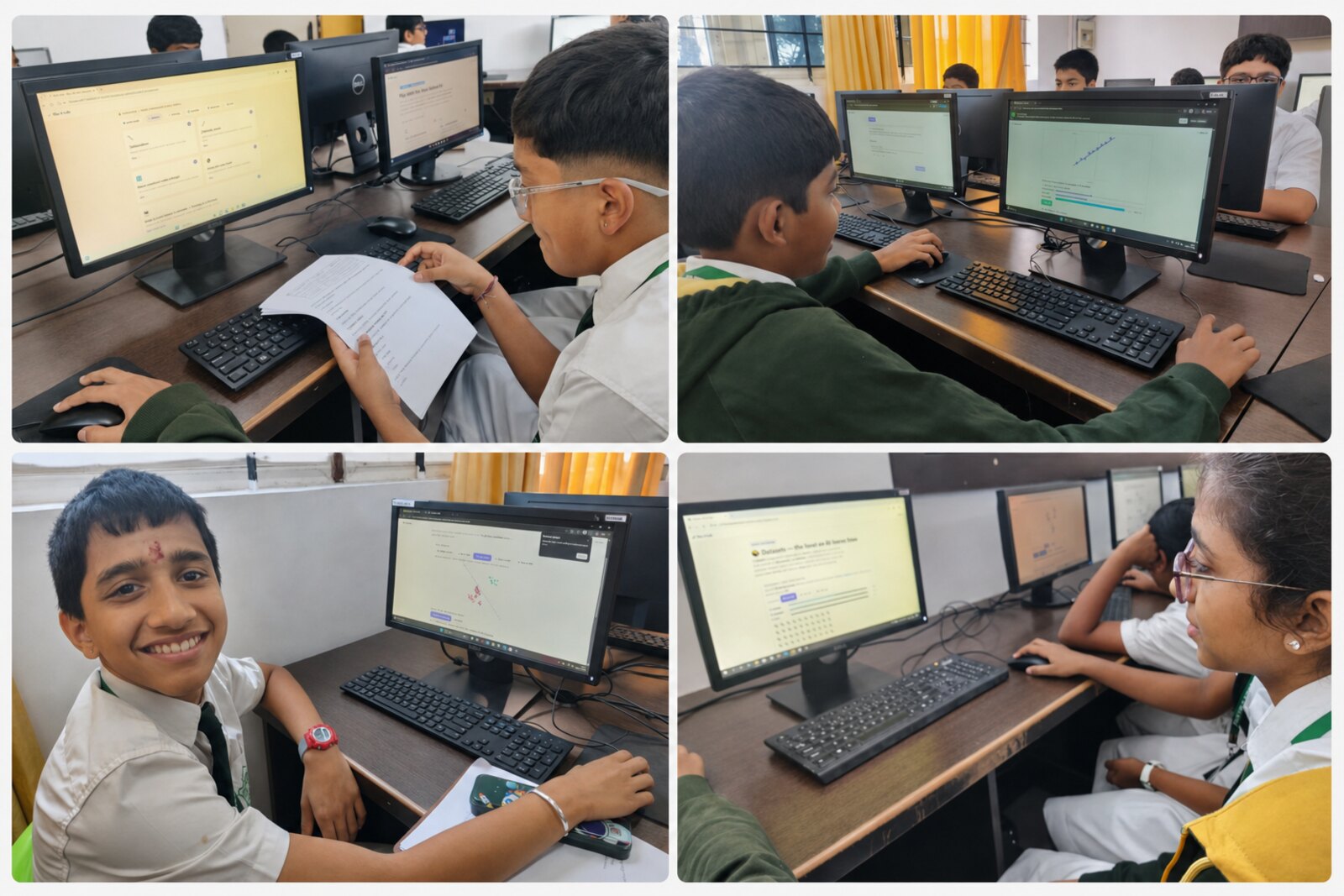
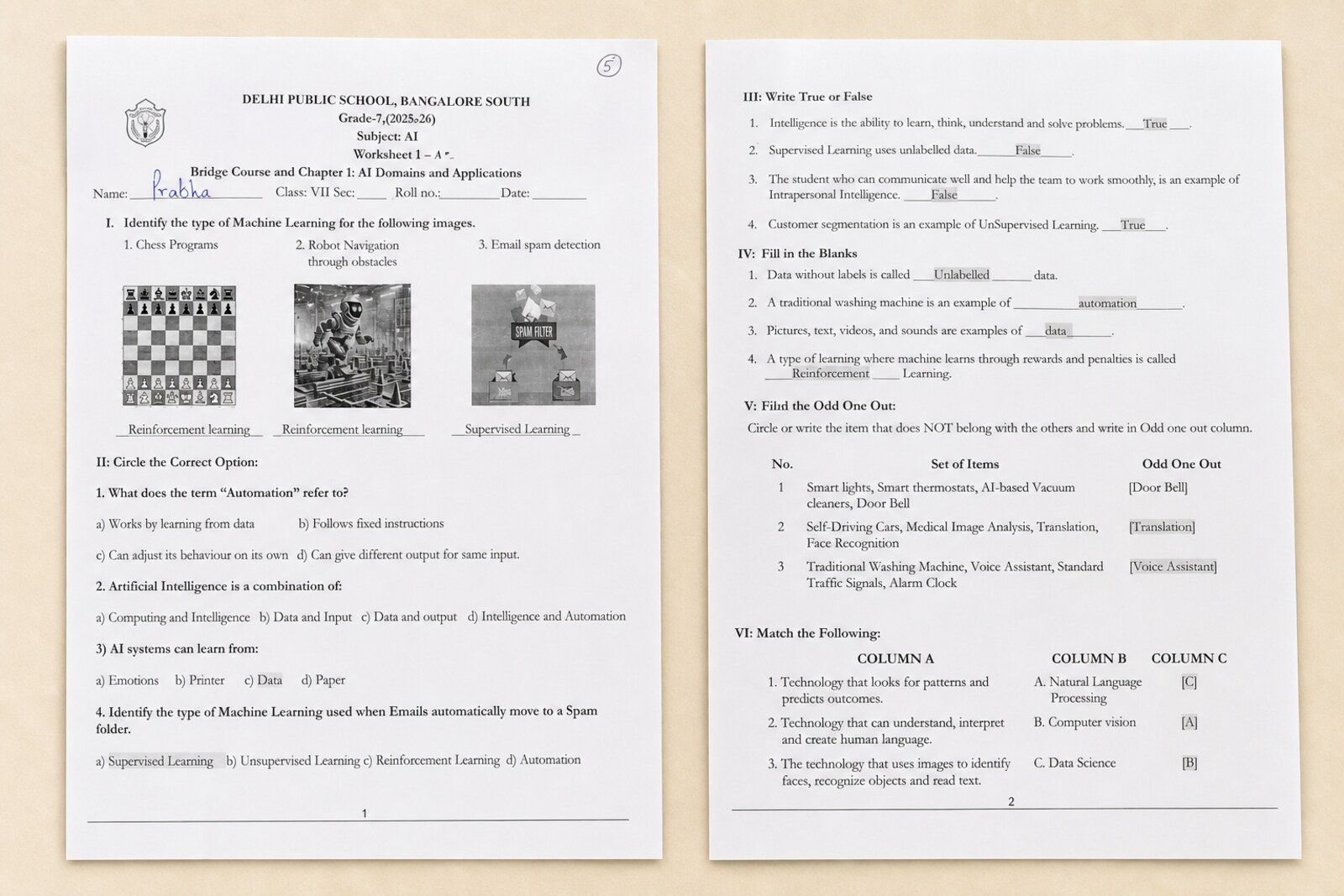
Grades 6–8 working through the AI Lab hands-on — playing the activities, following the printed worksheets, and reasoning about how machines learn.
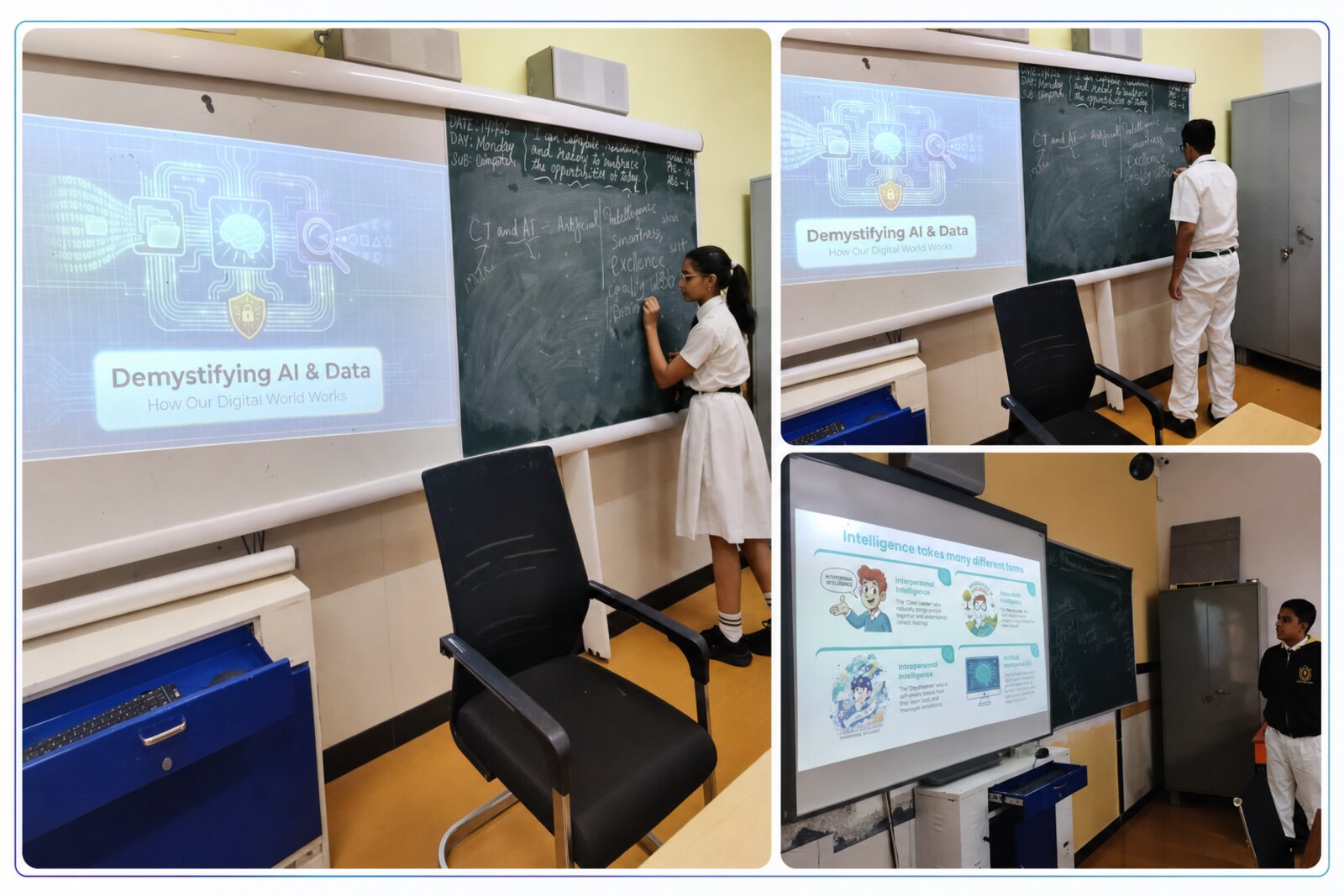
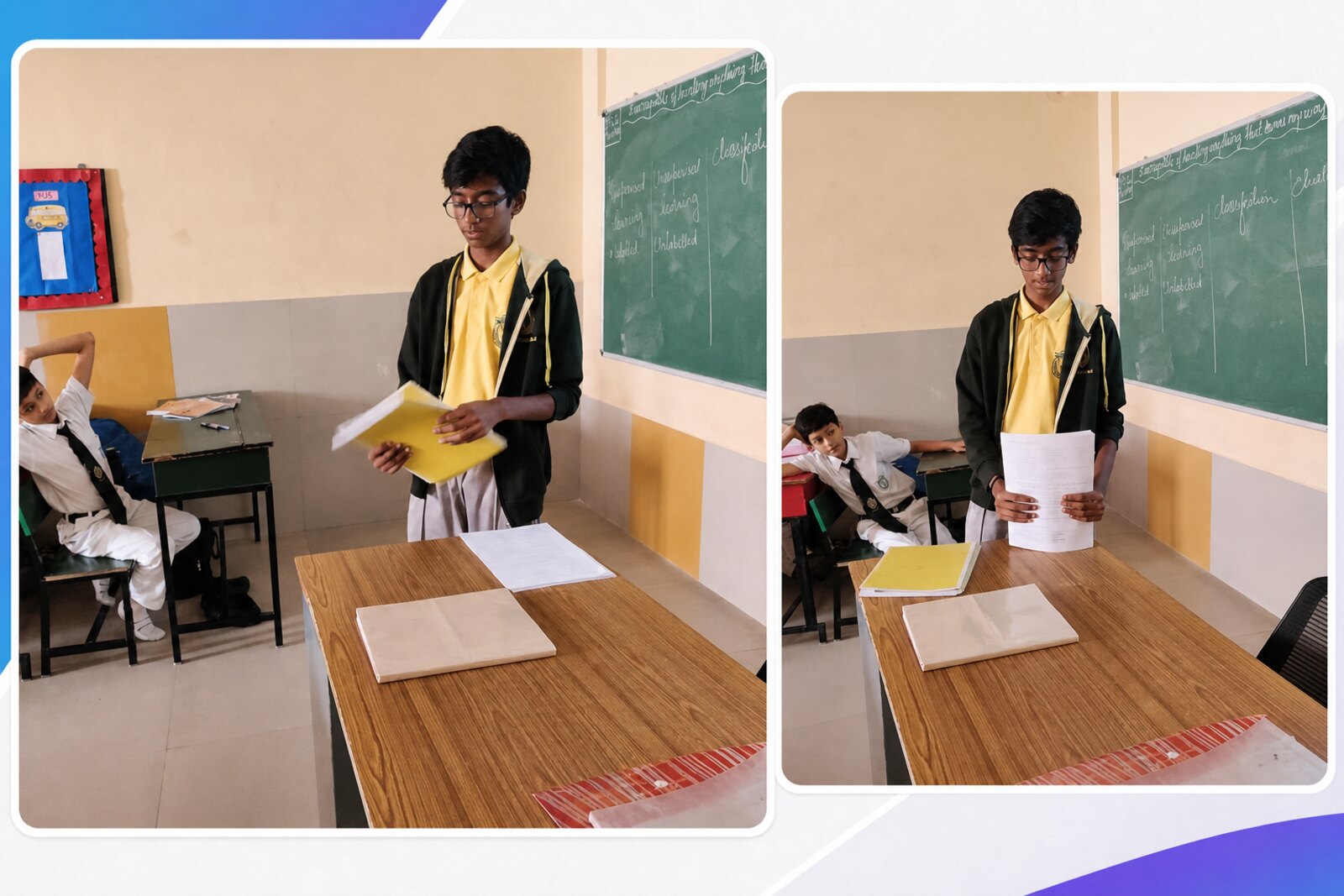
Real classroom sessions · students exploring the live AI Lab activities
The Big Idea
Children already think like learning machines
Every child recognises faces, guesses objects from half a glimpse, sorts their toys, and finishes a sentence before it's spoken. This practice turns those everyday abilities into a doorway to Artificial Intelligence — starting concrete, ending abstract.
😶🌫️
The Problem
Children meet AI only as a finished tool — it recognises faces, recommends videos, answers questions. They see the output but not the thinking. So AI feels magical, mysterious, or mechanical.
💡
The Answer
Begin with the child's own experience. Don't open with "ML is a subset of AI." Open with "How do you recognise your friend's face?" Abstraction emerges after the play, never before.
🎯
The Goal
Not to make AI experts — to build conceptual readiness. Children should grasp that AI learns from examples, finds patterns, compresses information, and can make mistakes.
👧🧒
Who it's for
Designed for Grades 3–8, the same core idea stretches across the whole range with different depth.
Grades 3–5 · observe, sort, group, match, guess, spot patterns through play
Grades 6–8 · features, training examples, classification, representation, compression, layers, prediction, responsible AI
📚
Where it fits
It needs no prior coding — only curiosity, participation, and the ability to notice patterns in familiar things. It can run inside:
MathematicsScienceComputer ScienceLanguageSocial ScienceActivity periodAI-readiness club
The Learning Arc
One idea, carried from the playground to the LLM
The whole practice rests on a single thread: observe examples → find useful patterns → compress them → use them to classify, predict or generate. The same thread runs through every module.
1
The Brain
I recognise things from partial clues
→
2
Sorting
The same things group in many ways
→
3
Training
A learner improves from examples
→
4
Pixels
Images are just grids of numbers
→
5
Compression
Keep what matters, drop the rest
→
6
Language
Predict the next word from context
Classroom Implementation
Six connected modules — with live demos
Run them as a short workshop, a six-period intervention, a club activity, or an interdisciplinary project. Each module shows how the teacher leads it on the left and a working demonstration on the right. And every module carries a "You ↔ The Machine" panel — first the child does the task, then we show the computer doing the very same thing. Every module ends the same way: do the task → describe it → see the machine mirror it → then name the idea.
Module 1
The Brain as a Pattern Finder
The teacher shows partly hidden pictures, incomplete letters, blurred animals, shadows or half-drawn faces. Children guess — and succeed even with incomplete information. Then the key question: "How did you know?"
1 Flash a blurred or half-hidden image and ask the class to guess.
2 Ask "how did you guess?" — children say "I've seen one before" / "a clue helped."
3 Reveal the big idea: the brain compares input with past experience and fills the gaps.
4 Build the class chart "My Brain Finds Patterns" — a friend's face, a song's tune, a fruit's smell.
Same mechanism, two learners
🧒 You do it by…
comparing the few clues you see with every dog you've ever seen, then filling the gaps — "it's a dog!"
≈
🤖 The machine does it by…
turning the photo into numbers, matching them to patterns learned from thousands of photos, and scoring a guess.
▶ Watch the machine recognise the same picture
🐶
the picture
→
neural network (trained on examples)
→
scored guesses
The picture feeds into a neural network — layers of tiny “neurons” trained on thousands of examples — which lights up to score each guess.
Same idea: both recognise things from incomplete clues by matching against past examples.
patterncluepredictionpast experience
Live demo · drag the slider
Reveal the picture slowly. Notice how few clues your brain needs.
🐶
Module 2
Sorting, Grouping & Classification
Children sort cards of animals, fruits, vehicles, letters and shapes into "obvious" groups — then the teacher asks them to sort the very same cards a different way. A mango is a fruit… but also a "yellow thing," a "thing with seeds," a "thing we eat."
1 Sort cards the obvious way (animals / fruits / vehicles).
2Re-sort the same cards by colour, size, legs, wheels, living/non-living.
3 Give a new card — "where does it go, and why?" Children must justify.
4 Bridge to ML: a model also picks useful features to classify new examples. (Younger: "a feature is a useful clue.")
Same mechanism, two learners
🧒 You do it by…
choosing a feature — colour, legs, wheels — and dropping each card into the group it fits. A new card? Check its features, pick the group.
≈
🤖 The machine does it by…
measuring those same features as numbers and drawing boundaries between groups. With labels it's classification; finding the groups on its own is clustering.
▶ Watch the machine group the same items
living →
moves on its own →
Each item becomes two numbers (its features). The machine plots them and circles the points that sit close together.
Same idea: sort by useful features, then place new items by where their features land — exactly what you just did with the cards.
featurelabelclassificationclusteringrule
Live demo · change the feature
Same nine cards. Watch them re-group instantly when you change the sorting rule.
Module 3
Training a Human Model
One child becomes the "machine." The class trains them with labelled examples — apple = healthy, chips = junk — then tests with new items. Mistakes are the gold: why did the machine get juice or homemade food wrong?
1 Pick a "machine." Feed labelled examples one by one.
2 The machine infers the rule from the examples alone.
3Test with unseen items — banana, pizza, sprouts, juice.
4 Discuss mistakes → memorisation vs. generalisation; quality & variety of examples matter.
Same mechanism, two learners
🧒 You (as the machine)…
watch a few labelled examples, spot the rule yourself, and adjust it whenever the class says "wrong!"
≈
🤖 The machine does it by…
nudging its internal numbers — its weights — a little after every wrong answer, until its guesses match the labels. That nudging is training.
▶ Watch the machine learn by adjusting weights
accuracy on tests—
Each feature has a “weight” — how strongly it points to junk or healthy. Every wrong answer nudges the weights, and accuracy climbs.
Same idea: learn a rule from labelled examples by correcting mistakes — more varied examples, better generalisation.
trainingweightstestingerrorgeneralisation
Live demo · train, then test
Train the machine on 6 examples, then keep testing. Watch it stumble on grey-area items.
🤖
Press “Train me” to begin.
Module 4
From Pixels to Pictures — How Machines See
A computer does not see a picture the way we do — it receives numbers. A filled square is 1, an empty one is 0. Children make pixel-art on graph paper, swap grids, and decode each other's images. Then: how a neural network builds up from edges → shapes → parts → answer.
1 Draw a grid; fill squares to make a letter or smiley.
2 Rewrite it as 1s and 0s — the image becomes data.
3 Compare two different "A"s — surface differs, deep structure stays.
4 Act out a human neural network: Layer 1 spots lines, Layer 2 combines into parts, Layer 3 names it.
Same mechanism, two learners
🧒 You (the human network)…
Layer 1 spots lines, Layer 2 joins them into parts, Layer 3 names the whole thing — "it's an A!"
≈
🤖 The machine does it by…
having each layer multiply the pixel-numbers by its weights and pass the strongest signals up — edges → parts → object — the very same stack.
▶ See each layer as numbers × weights
pixels
×w
edges
×w
parts
→
answer
Each layer multiplies the numbers coming in by its weights and passes the strongest signals on — edges, then parts, then the answer.
Same idea: understanding is built up in layers, simple clues first — whether the layers are children or maths.
pixel0 / 1representationlayers
Live demo · click cells & fire the network
Click squares to draw. Toggle the numbers to see the image as data.
The human neural network
Layer 1 edges
line /
curve ⌒
corner ∟
→
Layer 2 parts
triangle top
cross bar
→
Layer 3 answer
“It's an A!”
Module 5
Compression — Keeping What Matters
Do you remember every tiny detail of yesterday's classroom? No — yet you still recognise it. The teacher flashes a detailed picture, hides it, and asks children to redraw from memory. They keep the structure, drop the clutter. Forgetting detail is a feature, not a bug.
1 Ask: do you recall every detail of a face you saw yesterday?
2 Flash a busy picture briefly, then hide it.
3 Children draw from memory — compare kept vs. forgotten.
4 Name it: compression = keep useful info, drop the rest. AI learns compact representations too.
Same mechanism, two learners
🧒 You do it by…
keeping only the gist of yesterday's classroom — enough to recognise it again — and letting the tiny details fade.
≈
🤖 The machine does it by…
squeezing the image into a short list of numbers — an embedding — that holds only what matters for the task, and dropping the rest.
▶ Watch the machine compress a picture
16 numbers
→
4 numbers
→
rebuilt
The picture (16 numbers) is squeezed into a tiny “embedding” of 4 — then rebuilt. The shape survives; the fine detail is dropped.
Same idea: keep the useful information, forget the clutter — a smaller, smarter memory.
Watch the busy scene for 3 seconds. See what your "memory" keeps.
Press “Show the scene” to start.
Module 6
From Image Recognition to Large Language Models
"The sun rises in the ___." Children fill it instantly — because they've heard thousands of similar sentences. That's exactly what a Large Language Model does: it learns patterns in language and predicts likely continuations from context. (Carefully noted: an LLM is not a human brain — the analogy explains learning-from-examples only.)
1 Write incomplete sentences; children predict the missing word.
2 Ask "how did you guess?" → context + past language experience.
3 Explain LLMs learn word patterns from huge amounts of text.
4 Tie it together: pixels, sound, words — same process: observe → pattern → compress → predict.
Same mechanism, two learners
🧒 You do it by…
using the words so far plus every sentence you've ever heard to feel which word should come next.
≈
🤖 The machine does it by…
scoring a probability for every possible next word and picking from the likely ones — learned from huge amounts of text.
▶ See the machine score every word
“The sun rises in the ___”
The model gives every word in its vocabulary a probability, then keeps the few most likely — here the top guesses for the blank.
Same idea: predict what's next from context and past experience. (An LLM is not a brain — only the learning-from-examples part is alike.)
contextprobabilitypredictionlanguage model
Live demo · which word comes next?
The bars show how likely each word is — just like a language model's guesses. Click one to fill the blank.
Sample Classroom Exercises
Eight ready-to-run activities
Each one is low-cost, paper-friendly, and tied to a specific CT/AI concept. Mix and match to fit a single period or a six-session sequence.
👉 Tap any card to play the activity live
🔢
EXERCISE 01
Complete the Pattern
Children continue sequences of numbers, shapes, colours or sounds.
→ builds pattern recognition
▶ Play activity
🔍
EXERCISE 02
Guess the Object from Clues
The teacher reveals clues one by one; children name which clue helped most.
→ introduces feature importance
▶ Play activity
🎓
EXERCISE 03
Train Your Friend
Children feed labelled examples to a classmate acting as the machine.
→ training, testing & error correction
▶ Play activity
🟦
EXERCISE 04
Pixel Art Recognition
Drawings become grids of 0s and 1s, then get swapped and decoded.
→ images can be represented as data
▶ Play activity
🧠
EXERCISE 05
Compression Drawing
Observe a detailed image, then redraw it from memory.
→ useful info is preserved, detail dropped
▶ Play activity
🧍🧍🧍
EXERCISE 06
Human Neural Network
Children stand in layers: detect clues → combine → predict.
→ layered processing made physical
▶ Play activity
💬
EXERCISE 07
Predict the Next Word
Children complete sentences and discuss how context guides the guess.
→ connects to language models
▶ Play activity
⚠️
EXERCISE 08
When AI Makes Mistakes
Ambiguous cases — bat (animal vs. sport), tomato (fruit vs. vegetable).
→ context, ambiguity & responsible AI
▶ Play activity
CT & AI Competencies Addressed
What every child takes away
The practice builds a connected set of Computational Thinking and AI-readiness competencies — each grounded in an activity the child has physically done.
🔁
Pattern Recognition
Spotting repeated structure in images, objects, words & sequences
🪓
Decomposition
Breaking recognition into smaller clues: shape, colour, size, edges
✨
Abstraction
Ignoring noise, keeping only the useful features
🗂️
Classification
Grouping new examples by learned patterns
🎓
Training & Testing
See examples, then apply the rule to new cases
🌍
Generalisation
Using patterns on unseen examples, not just memorising
📦
Representation & Compression
Keeping compact, meaningful information
⚖️
Responsible AI
AI outputs aren't always right — check them thoughtfully
Evidence-Based Impact
From "AI is a robot" to "AI learns from examples"
Impact is measured with pre/post assessments, worksheets, group charts, teacher observation, discussion and reflection cards — built into the activity from day one.
Three Class 8 sections (120 students): taught with the computer, with activities, or not taught — marks before & after · sample marks
Sample Pre-Test Questions
What is a pattern?
How do you recognise a dog even if every dog looks different?
What does it mean to learn from examples?
Can a machine make a mistake?
What is AI?
How does your brain guess the next word in a sentence?
Sample Post-Test Questions
How is classification connected to pattern recognition?
What's the difference between memorisation and generalisation?
Why does a machine need many examples to learn?
How can an image be represented as numbers?
What does compression mean?
Why should we check AI answers before trusting them?
The shift we look for
❝ AI knows the answer. ❞ tool-based thinking (before)
→
❝ AI has learned from many examples and finds patterns. ❞ concept-based thinking (after)
❝ AI is always correct. ❞ before
→
❝ AI can make mistakes if it learns from wrong or incomplete examples. ❞ after
Student reflection card
Today I learned that AI is not magic. It learns from examples and finds patterns.
One activity that helped me understand this was .
I also learned that AI can make mistakes when .
I will use AI responsibly by .
📝
Worksheets
Before-and-after, side by side.
📸
Photographs
Group activities & charts in action.
🟦
Pixel grids
Student-made image data.
💭
Reflection cards
Qualitative shift in understanding.
Inclusivity
Every child can take part
No expensive devices, no prior coding. Paper cards, charts, board drawings, movement and discussion carry the core learning. The design reaches every learning style.
🎨 Five learning styles, one activity set
👁️
Visual learners
Images, grids, charts & drawings
🤸
Kinesthetic learners
Sorting games, role-play, human neural network
🗣️
Verbal learners
Sentence prediction, explanation, discussion
🧮
Analytical learners
Classification rules & pattern discovery
🖌️
Creative learners
Drawing, storytelling, designing examples
🤝 Equity built in
🔀
Mixed groups
Rotate leadership so every voice leads
🙋
Quieter students first
Invited to explain observations aloud
⚖️
Gender-balanced demos
Equal turns in front-of-class roles
🏠
Familiar examples
Everyday objects let every background join in
💡
The real focus
Not who knows computers — but how every child observes, classifies & predicts
Scalability, Replication & Challenges
Built to travel — city, town or village
Low-cost materials make it replicable in urban, semi-urban and rural schools. Modular design means schools can adopt a few modules and grow.